English

Follow Avatar Anthony Caplin
Updated : Created :
In this article

C.A.T4 - Operating Instructions

Click Here v1.jpeg
Read the user guide. 
Use the C.A.T with a Genny.

1 Direct Connect

Use the Direct Connect leads to apply the locate signal to a specific cable or pipe. Connect the red lead to the target line, and the black lead to either a suitable earthing point or the earth spike.

Signal Clamping

When direct connection to a specific cable or pipe is not possible, place a signal clamp around the target cable or pipe. The locate signal will be applied to the target cable or pipe.

Induction

With no accessory connected, the Genny can broadcast the locate signal onto underground utilities in the area. Always use the Genny at least 10 metres away from the C.A.T in this Mode.

2 Turn the Sensitivity Control to maximum before starting.

Use Avoidance Mode   to scan for Genny, Power and Radio signals simultaneously.


3 First walk the perimeter of the proposed excavation site. Then walk the length of the excavation site, moving across the width in parallel sweeps. If using a Genny in induction mode, position the Genny as shown.
Then sweep across the width of the excavation site, moving up the length. If using a Genny in induction mode, position the Genny as shown.

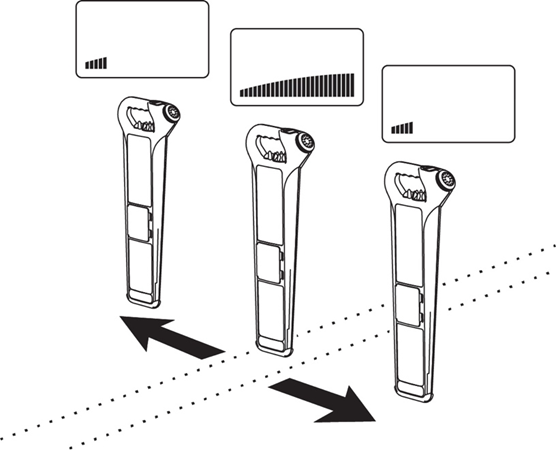
4 The bargraph and sound levels increase as the C.A.T gets closer to a cable or pipe, and reduce once it passes beyond it.

If the readouts pass maximum over a pipe or cable, turn the sensitivity control down and move back over the locate position. By repeating this process, the cable or pipe’s position can be pinpointed.
If necessary, switch to a dedicated mode to pinpoint a specific cable or pipe.

5 Establish the cable or pipe’s direction by rotating the C.A.T above it. The C.A.T is straight across the cable or pipe when the bargraph and audio are at a maximum, and is directly inline with it when at a minimum. Check for accuracy by varying the sensitivity control while rotating the C.A.T.
6 Trace the pipe or cable across the area to be excavated and mark if required.  Then resume sweeping over the excavation site.
7 For support or training, contact Radiodetection via www.radiodetection.com.  
As for all safety equipment, annual service and calibration is strongly recommended.
Refer to the User Guide for advanced location techniques.
Radiodetection accepts no responsibility for service, calibration or repairs carried out by non-authorised persons.
 

Genny4 - Usage Options

Direct Connect Output may be hazardous.

To be used by competent/trained personnel only.

Read the user guide.

Click Here v1.jpeg
Direct Connection
Use the Direct Connect leads to apply the locate signal to a specific cable or pipe. Connect the red lead to the target line, and the black lead to Earth, either through a suitable earth point or by using the earth spike. Audio tone change indicates good connection.
 
Signal Clamping 
When Direct Connection to a cable or pipe is not possible, place a signal clamp around the target line, ensuring the clamp is completely closed. The locate signal will be applied to the target line through the clamp. Audio tone change indicates good connection.
 
Induction
When Direct Connection or Signal Clamping is not possible, the Genny can induce the locate signal on conductors in the area. Always use the C.A.T at least 10 metres away from the Genny in Induction Mode.


User Guide

90/UG092ENG/07

C.A.T Accessories

 90/ACC-CAT-ENG/11