LPM Locate Assurance offers role-based access for different responsibilities across field teams, supervisors, and utility organizations.
Each user role is defined with permission levels to enhance data quality, accountability and appropriate visibility.
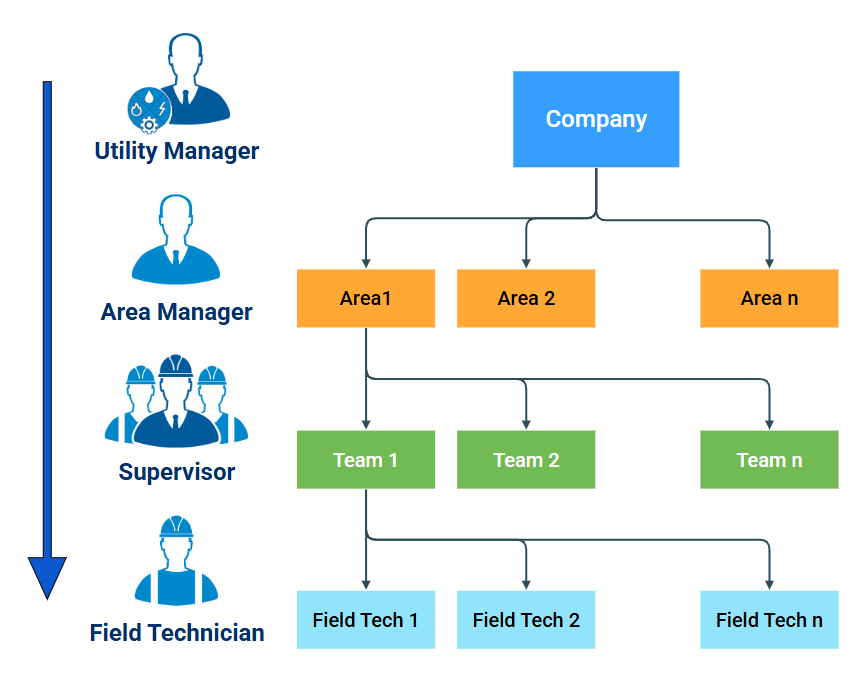
User Grouping
Users belonging to a Locate Assurance company are organized into an hierarchical structure, as shown in the diagram above.
Area Managers, Supervisors and Field Technicians are organised into Areas and Teams.
User Role Descriptions
Utility Manager:
- Can view reports from all Areas and Teams across the organization
- Has access to analytics and AI insights at the organizational level
- Cannot close alerts
Area Manager:
- Oversees a specific Area within the organization.
- Has access to all Teams in their Area, viewing all related data, analytics and AI insights
- Cannot close alerts
Supervisor:
- Manages a single Team
- Can view all reports and activities for sites managed by their Team
- Has the ability to close alerts
- Can upload locate sessions using the MyRD LPM mobile app (requires a Field Tech license)
Field Technician:
- Assigned to a specific Team
- Can use the MyRD LPM mobile app to upload locate sessions
- Can view and export reports and sessions they have created individually
Permissions by user role
| Role | Use MyRD LPM app | View Own Reports | View Team Reports | Close Alerts | Access Analytics/AI Insights | Export Sessions | Scope |
|---|
| Utility Manager | No | No | Yes
(all teams) | No | Yes | No | Organization |
| Area Manager | No | No | Yes
(own area) | No | Yes | No | Area |
| Supervisor | Yes (with license) | Yes | Yes | Yes | No | Yes | Team |
| Field Technician | Yes | Yes | No | No | No | Yes | Individual |
LPM Locate Assurance License Matrix
All users require a license. The license types by role are:
| Role | License Type |
|---|
| Utility Manager | Viewing |
| Area Manager | Viewing |
| Supervisor | Viewing or My RD LPM |
| Field Technician | My RD LPM |