Initial Set-Up Checklist
You will now perform the following tasks in preparation for Launching the Locate Simulator 2.0 Experience:
- Attach Left Controller to the Locate Receiver.
- Power on the Laptop & launch the Locate Simulator Application.
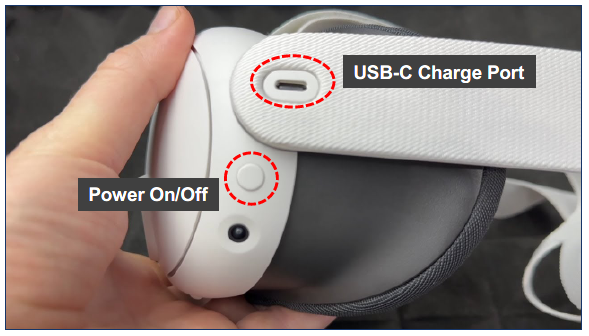
- Power on the VR Headset.
- Connect Wi-Fi to Laptop and VR Headset.
- On the Laptop, following Calibrate Room guidance instructions.
Locate Receiver Preparation
| Attach Left Controller to the Locate Receiver |
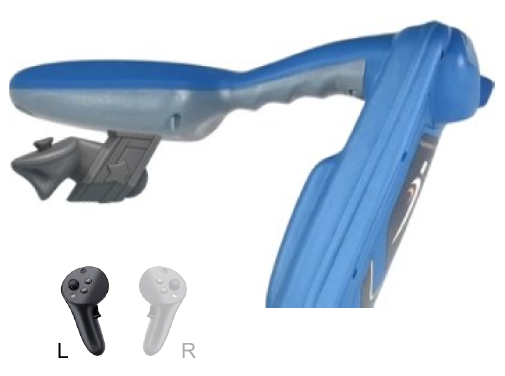 |
| Place the LEFT Controller into the Locate Receiver support assembly and ensure a secure fit. |
| The controller has multiple cameras onboard and uses what is known as “inside out” technology and computer vision algorithms to learn its environment. It is important the Controller does not move. |
| The Controllers have motion sensing activation technology & do not need to be turned on or off. |
Locate Simulator Application
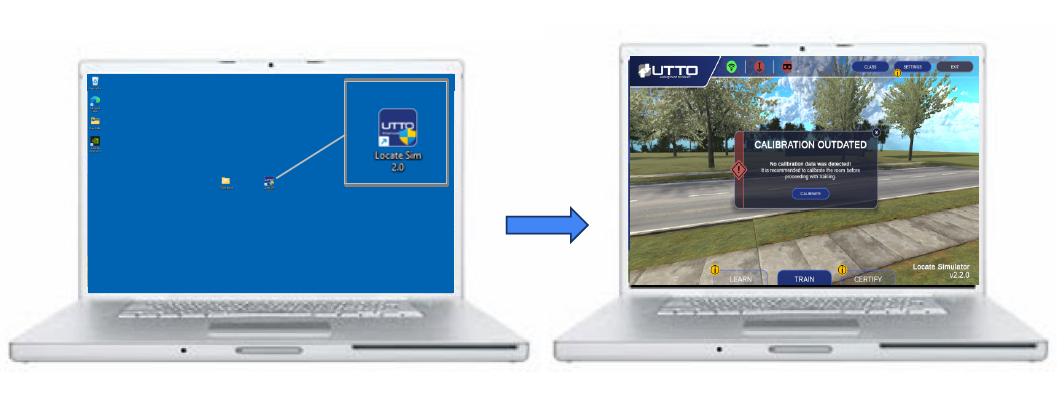
For peak performance, use laptop while plugged into A/C Mains when possible.
VR Headset On/Off & Charge Port