The Laptop and VR Headset must be connected to a common network.
 Router Network Name: "UTTO SIM WIFI" Router Network Name: "UTTO SIM WIFI" |
- Pair the laptop to the UTTOSimWifi router.
- Pair the VR Headset to the same network.
Setting Up Wi-Fi in the VR Headset
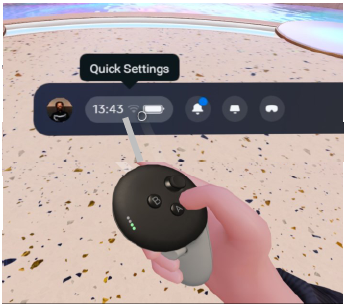
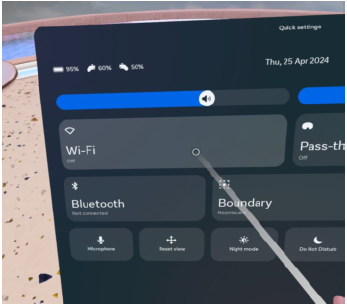
| Turn on the Headset & using the Right Controller, point at the Quick Settings area of the main panel. Pull controller trigger to select. | This will bring up a Wi-Fi panel option, select Wi-Fi and from the list displayed, select your target Wi-Fi network. If using supplied Router - Name: “UTTO SIM WIFI” |
 |  |
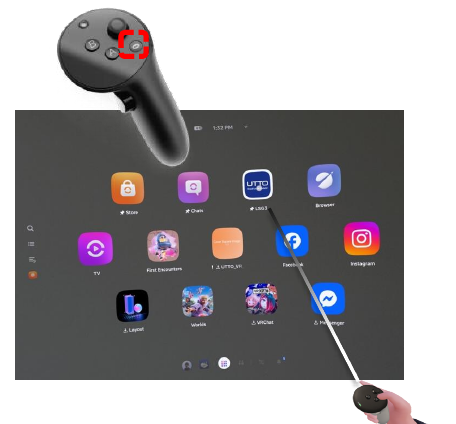
Meta Updated Setting Up Wi-Fi in the VR Headset and launching Locate Sim
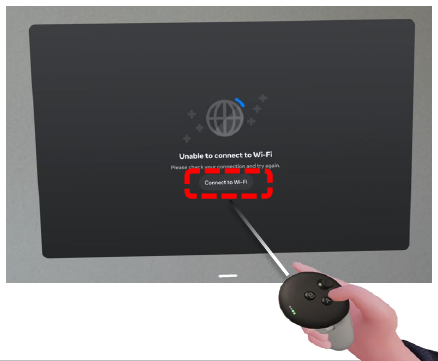
| Once you turn on the headset you will see the image below, press “Connect to Wifi” and then select the UTTO Sim Wifi from the list displayed. | After connecting to the wifi on the right controller press the Meta Button (highlighted below) then select the Locate Sim app. |
 |  |