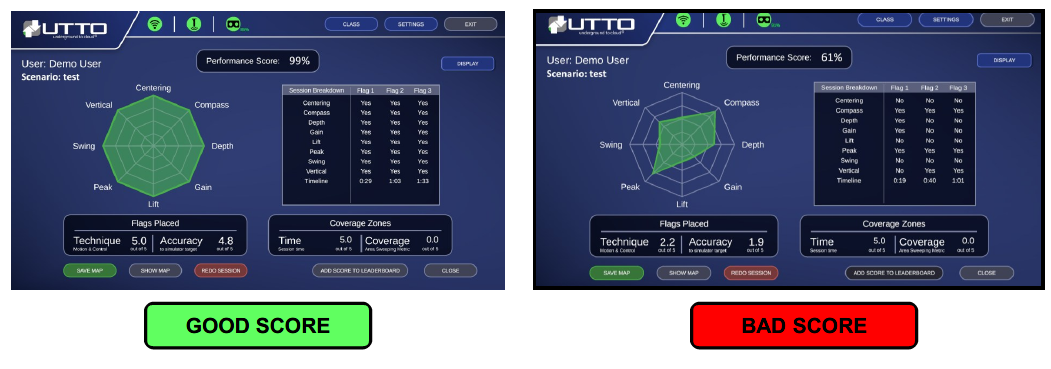
- It describes how the candidate performed (weighting and scoring of each variable can be configured in advanced settings, speak to your administrator if you want to change the default settings).
- The Radar (or Spider) chart displays a quick snapshot of performance, for a perfect score the chart would be solid green (Completely filled in).
- Unlike the real world, in the Simulator we know exactly “where” the target is positioned so the Accuracy score reflects proximity of capture flags to the target facility.
| 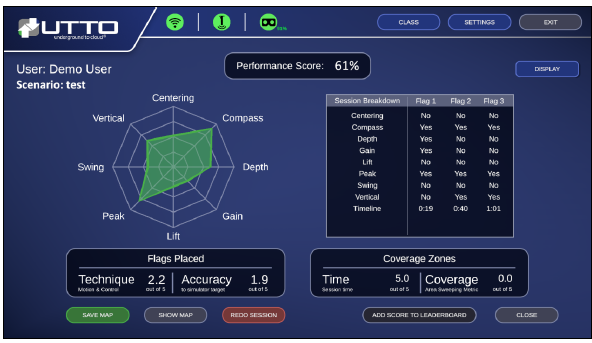 |
| In this Detailed Scoring view it can been seen there are quite a few problems as indicated by the incomplete Radar Chart and Flag table. The user failed many of the required metrics such as Gain adjustment and Centering, not performing a Lift operation plus the device failed Swing and Vertical. |
Comparing Good vs Bad Scores
To obtain jpeg images of a Trainee’s Performance Score, go to the laptop desktop folder named: “Locate Sim Files” and then “Results”